1
Add context
Describe the cards you want and attach a photo, image, or PDF when the source material matters.
Turn notes, lecture slides, photos, images, PDFs, and text prompts into editable flashcards—without spending the whole study session typing.
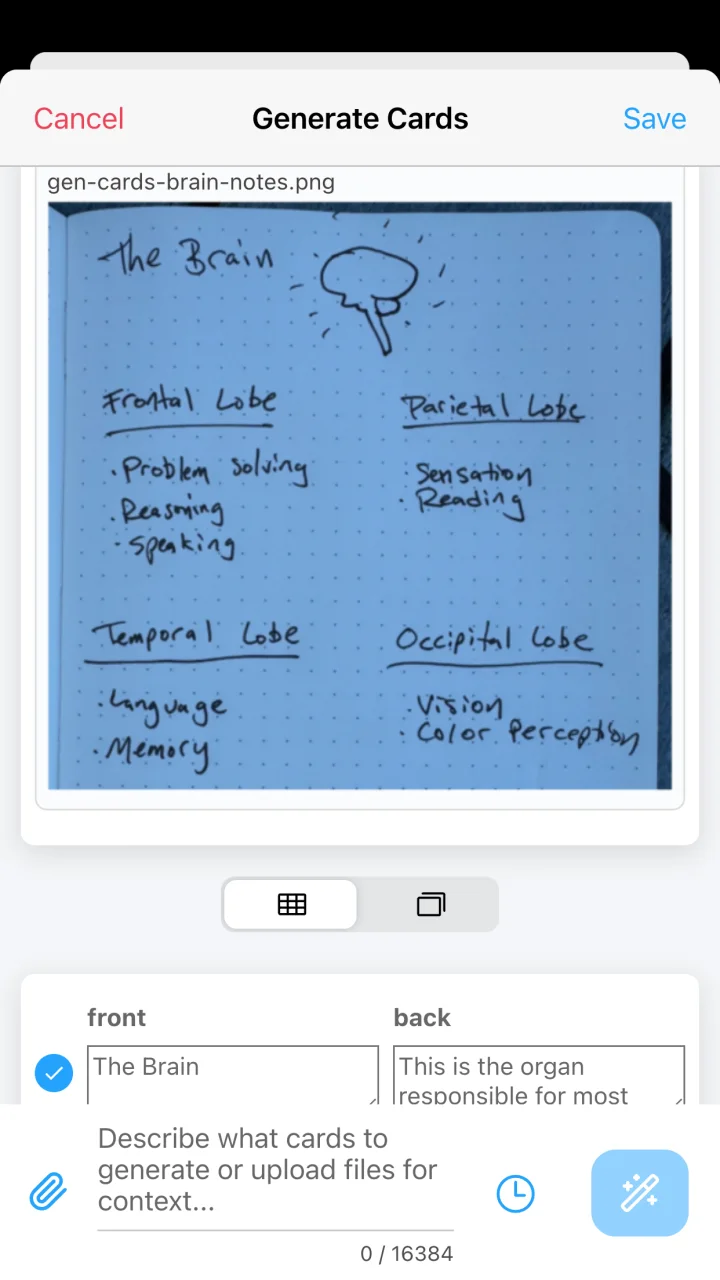
Describe the cards you want and attach a photo, image, or PDF when the source material matters.
AlgoApp creates front-and-back pairs that you can inspect as a grid or preview as actual cards.
Choose the useful cards, refine the wording, save them to your deck, and review with spaced repetition.
Good flashcards are clear, focused, and connected to what you are actually trying to learn. AlgoApp keeps generated cards editable and visible before they enter your deck, so AI can accelerate your work without taking away your judgment.
Photograph handwritten notes, a whiteboard, a sign, a menu, or a study diagram and use the image as context for new cards.
Attach a PDF such as lecture notes or course material and ask for cards focused on the topics you care about.
Describe a subject, learning goal, format, or level directly. This works well for definitions, comparisons, examples, and practice questions.
Add images and audio, translate fields automatically, have text read aloud, or use custom fields and layouts. Your generated cards live alongside cards you make manually or import from CSV and other sources.
A text prompt can stand alone, or you can attach images, photos, and PDF files as source context.
Yes. Review the result, choose the cards you want, edit their fields, and then save them to your deck.
After generation, cards can use AlgoApp's ordinary editing tools for formatted text, images, audio, automatic translation, text-to-speech, and custom fields.
When you use AI features, relevant prompts and card content may be sent to external AI vendors. Do not include personal information you do not want processed. See the Privacy Policy for details.
Generate your first deck in AlgoApp, then let spaced repetition take it from there.